
Streaming on the DipoleML API: every token as it is written
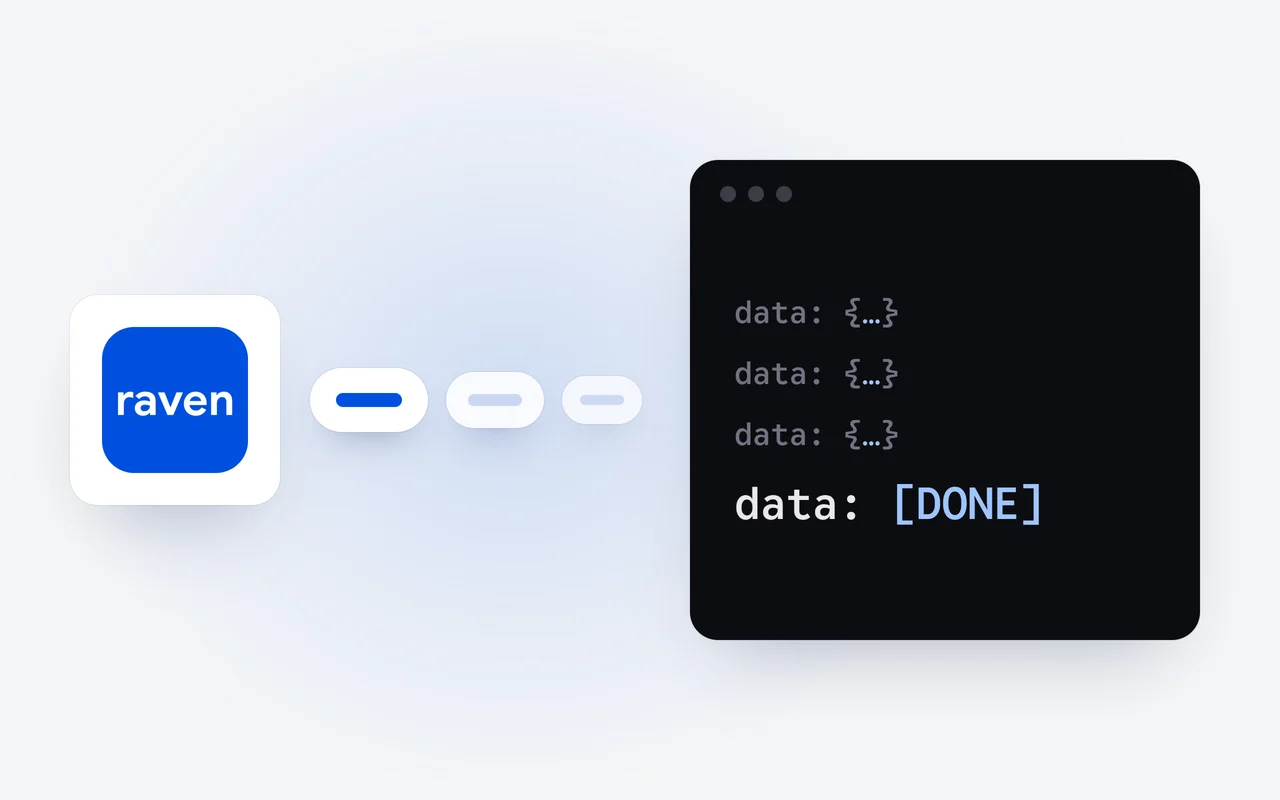
Set stream to true on a DipoleML API call, and Raven Flash or Raven Max sends the answer as server-sent events while it writes it. Each chunk carries the next piece of text, and the stream ends with a chunk that holds the usage, then data: [DONE]. Retry a failed stream only if no text has arrived.
Key facts
- Streaming has been part of the DipoleML API since launch day, October 1, 2026, in the OpenAI SDK format.
- Each event is one data: line holding a JSON chunk; join choices[0].delta.content in order to rebuild the answer.
- The chunk before data: [DONE] carries usage and has no choices; you do not have to ask for it.
- Once a stream has started its status is 200, so a failure shows up inside the stream; a stream with no finish_reason did not finish.
- Retry only when no text has arrived; a 402, or a 401 for an expired key, needs a change rather than another attempt.
On launch day, October 1, the DipoleML API went live with OpenAI-compatible chat completions, streaming, vision and tool use. This walk-through covers streaming: what a stream looks like, how to print each token as it arrives with the OpenAI Python SDK and read the usage at the end, and what to do when a stream fails.
Why stream an answer?
A long answer takes a while to write. Without streaming, your code waits for the last word before it can show the first. With streaming, the answer arrives in pieces while Raven Flash or Raven Max writes it, so a person sees the first words at once and reads along. Streaming changes when the text arrives, not what it costs.
What does a stream look like?
Set "stream": true on a Chat Completions call. The answer comes back as server-sent events, with the type text/event-stream. Each event is one data: line holding a JSON chunk, and joining choices[0].delta.content in order rebuilds the answer. Here is a short stream, trimmed to the fields that matter; each chunk also carries an id, its object type, chat.completion.chunk, and the model name:
data: {"choices":[{"index":0,"delta":{"content":"Caching keeps"},"finish_reason":null}]}

data: {"choices":[{"index":0,"delta":{"content":" a copy"},"finish_reason":null}]}

data: {"choices":[{"index":0,"delta":{},"finish_reason":"stop"}]}

data: {"choices":[],"usage":{"prompt_tokens":412,"completion_tokens":96,"total_tokens":508}}

data: [DONE]Ask for a stream
Set stream to true on a normal Chat Completions call.
Text in chunks
Each data: line holds the next piece of the answer in delta.content.
The answer ends
One chunk carries a finish_reason, such as stop.
Usage, then [DONE]
A last chunk with no choices carries usage, and data: [DONE] closes the stream.
Three things to know about it:
- Usage comes last. The chunk before data: [DONE] has an empty choices list and carries usage. You do not have to ask for it, and code that reads choices[0] must skip that chunk.
- The finish_reason closes the answer. It is stop when Raven has finished, and length when the answer reached max_tokens.
- Reasoning can stream too. Some deltas carry the model's reasoning in a field of its own, such as reasoning_content or reasoning, instead of content, usually before the first piece of the answer. Treat it as plain text.
How do I print tokens as they arrive?
Create an API key in your dashboard, add credits, and keep the key in an environment variable. Then ask for a stream and loop over its chunks. This sample prints each piece of text as it arrives, notes the finish_reason, and reads the usage from the last chunk:
import os
from openai import OpenAI, APIError

client = OpenAI(
    base_url="https://api.dipoleml.com/v1",
    api_key=os.environ["RAVEN_API_KEY"],
)

stream = client.chat.completions.create(
    model="Raven Flash",
    stream=True,
    messages=[{"role": "user", "content": "Explain caching in three sentences"}],
)

finish = usage = error = None
try:
    for chunk in stream:
        if chunk.usage:  # the last chunk before [DONE]
            usage = chunk.usage
        if not chunk.choices:
            continue
        choice = chunk.choices[0]
        if choice.delta.content:
            print(choice.delta.content, end="", flush=True)
        if choice.finish_reason:
            finish = choice.finish_reason
except APIError as e:  # an error chunk inside the stream
    error = e.message

print()
if finish is None:
    print("The answer did not finish.", error or "")
elif usage:
    print(usage.prompt_tokens, "tokens in,", usage.completion_tokens, "tokens out")
Two details carry the weight. The usage check comes before the choices check, because the usage chunk has no choices. And the loop keeps the finish_reason, so the code knows whether the answer really finished.
What happens when a stream fails?
A request refused before the model starts gets a normal error answer with its HTTP status, and it is not billed. Once the stream has started, the status is already 200, so a later failure shows up inside the stream itself: a chunk with an error object in place of text, or a stream that ends early. When a chunk carries an error, the OpenAI Python SDK raises an APIError, which the sample catches.
Either way, no chunk carries a finish_reason. Treat a stream as complete only when one has arrived; anything else did not finish, however much text came before.
When should I retry, and when not?
Retry what time can fix, and change what it cannot.
Retry, with a growing wait:
- a stream that failed before any text arrived, up to three times;
- 429 with requests_per_minute: too many requests this minute, and the message gives the limit;
- 500: something failed on our side.
Do not retry; change something first:
- a stream that failed after part of the answer arrived: show what arrived and let the person ask again;
- 401 with key_expired: the key passed its expiry, so set a later one or create a new key;
- 402 with insufficient_credits: your credit balance is zero or below, so add credits;
- 402 with key_limit_reached: the key has spent its cap, so raise or remove the cap.
A retry sends the same request again, and the answer starts over from its first token. That is why a stream that has already shown text is better left for the person to send again.
What does a streamed answer cost?
The same as the same answer in one piece. It is billed from the tokens in its usage: Raven Flash costs $0.50 per 1M input tokens and $2.50 per 1M output tokens; Raven Max costs $1.25 and $6.25. Calls are paid from prepaid credits that never expire, and every price is on the pricing page.
Where do I go next?
To let Raven call functions in your own code, read tool calling on the DipoleML API; to send it a screenshot or a scan, read vision on the DipoleML API. The streaming reference has the wire format in full, and the API page lists what the DipoleML API supports.
Questions and answers
Do I have to ask for usage in a stream?
No. Every stream ends with a chunk that carries usage, then data: [DONE]. That chunk has no choices, so code that reads choices[0] must skip it.
Does a streamed answer cost more?
No. It is billed from the tokens in its usage, like the same answer in one piece, at the model's input and output prices.
Should I retry a stream that fails halfway?
No. Show what arrived and let the person ask again, since a new attempt starts the answer over. Retry on your own only when no text has arrived yet, with a growing wait, up to three times.
First published Last updated